协程常用方法与可等待对象:async/await、Task、Future 全面指南
系统梳理 Python 协程的基本概念、语法、可等待对象、运行方式与常见 API 使用方式。
协程常用方法与可等待对象:async/await、Task、Future 全面指南
概述
协程是一种用户态的轻量级并发工具,依赖协作式调度(非抢占)。Python 在 3.5+ 原生支持 async/await 语法,并由 asyncio 提供事件循环、任务调度等基础设施。本篇聚焦协程的核心概念、常见 API 与运行方式。
学习目标
- 掌握同步/异步、阻塞/非阻塞的基本概念
- 理解协程函数与协程对象的区别
- 熟悉可等待对象(Awaitable)的三类:Coroutine、Task、Future
- 会运行协程:asyncio.run、await、create_task 与 TaskGroup
基本概念回顾
- 阻塞:等待资源/事件期间无法继续执行其它工作
- 非阻塞:等待期间可继续做其它工作(通常结合事件通知/回调)
- 同步:按顺序执行,前一步未完成则等待
- 异步:发起后无需等待完成,通过回调/状态/通知获取结果
定义与调用协程
- 协程函数:定义形式为 async def 的函数
- 协程对象:调用协程函数得到的对象,需要在事件循环中运行
# 定义异步函数(协程函数)
async def async_double(x):
    return 2 * x

# 错误示例:同步函数内不能直接 await
# def print_double(x):
#     print(await async_double(x))  # 语法错误

# 正确:在异步函数中使用 await
async def print_double(x):
    print(await async_double(x))
可等待对象(Awaitable)
一个对象能被 await,即为可等待对象。主要包括:
- 协程(Coroutine):由 async def 返回
- 任务(Task):通过 asyncio.create_task() 封装调度协程
- Future:低层的“占位结果”,Task 实际上是 Future 的子类
注意:await 之后必须是 awaitable 对象,否则会报错。第三方库需明确提供异步 API 才能被 await。
运行协程的几种方式
1) asyncio.run(coro)
- 作为程序入口,创建并管理一个新的事件循环,运行 coro 直到完成
- 同一线程中已有事件循环运行时,不能再次调用
import asyncio

async def main():
    await asyncio.sleep(1)  # 模拟 IO 等待
    print('hello')

asyncio.run(main())
2) 直接 await 协程
- 只能在另一个协程内使用,用于等待某个协程的结果
async def add_one(x: int) -> int:
    return x + 1

async def main():
    val = await add_one(1)
    print(val)  # 2
3) asyncio.create_task(coro)
- 将协程打包为 Task 并调度执行,返回 Task 对象
- 任务会在事件循环“并发”运行,需要 await 等待其完成
import asyncio

async def my_coroutine():
    print("Hello")
    await asyncio.sleep(1)
    print("world")

async def main():
    # 创建任务并调度执行
    task = asyncio.create_task(my_coroutine())

    # 可以在等待 task 期间做其他事
    # ...

    # 等待任务结束
    await task

asyncio.run(main())
4) TaskGroup(3.11+)
- 用于成组管理任务,语义更清晰,异常传播更自然
import asyncio

async def worker(i: int):
    await asyncio.sleep(0.1)
    print(f"任务 {i} 完成")

async def main():
    async with asyncio.TaskGroup() as tg:
        for i in range(5):
            tg.create_task(worker(i))  # 创建并发任务

asyncio.run(main())
Task 对象详解
Task 表示被事件循环调度执行的协程,通常通过 asyncio.create_task() 创建。一个事件循环同一时刻只运行一个 Task,但在 I/O 等待时会切换到其他 Task,实现并发效果。
- 创建:task = asyncio.create_task(coro)
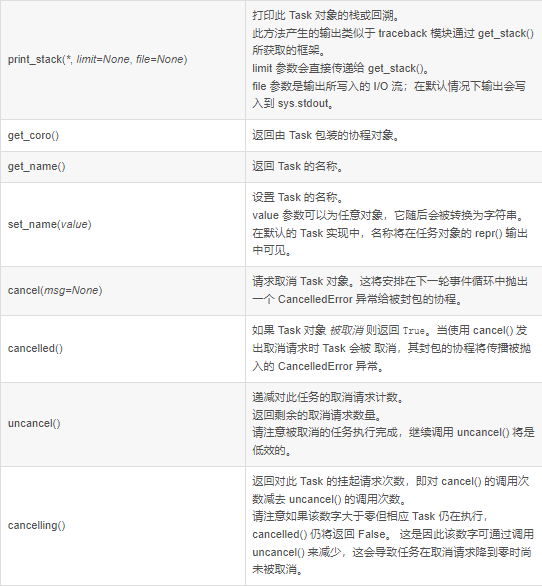
- 取消:task.cancel() -> 在下一个调度点向任务抛出 asyncio.CancelledError
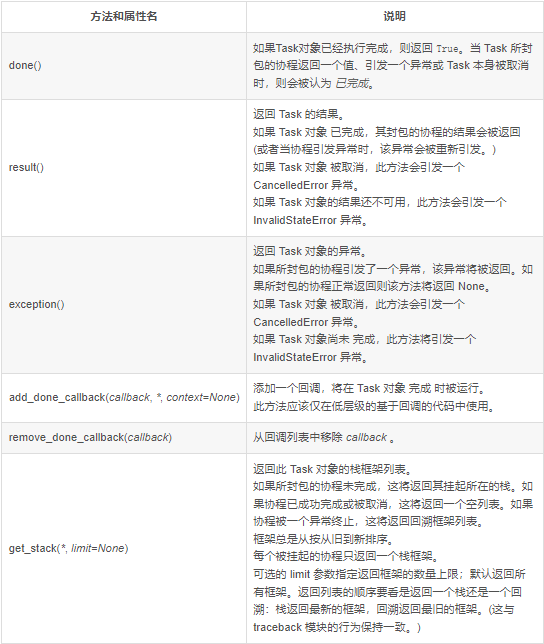
- 状态:task.done()/cancelled()/exception()/result()
- 命名:Python 3.8+ 支持 task.set_name()/get_name()
主要的方法和属性(示意图):
示例:演示取消任务以及捕获取消异常
# 取消任务示例
import asyncio

# 异步任务:长时间休眠
async def cancel_me():
    print('cancel_me(): before sleep')
    try:
        # 模拟长时间任务(例如 I/O 等待)
        await asyncio.sleep(3600)
    except asyncio.CancelledError:
        print('cancel_me(): cancel sleep')
        # 可以选择继续向上抛出,通知外层任务已被取消
        raise
    finally:
        print('cancel_me(): after sleep')

async def main():
    # 创建任务并调度执行
    task = asyncio.create_task(cancel_me())

    # 等待 1 秒后取消任务
    await asyncio.sleep(1)
    task.cancel()  # 请求取消

    try:
        await task  # 等待任务响应取消
    except asyncio.CancelledError:
        print('main(): cancel_me is cancelled now')

asyncio.run(main())
超时控制:asyncio.wait_for()
asyncio.wait_for(awaitable, timeout) 用于为“等待某个可等待对象完成”增加超时时间。若在 timeout 秒内未完成,将抛出 asyncio.TimeoutError。
- 超时后会尝试取消内部 awaitable(向其抛出 CancelledError),行为与其实现有关
- 常用于兜底防止卡死,务必配合异常处理
# 超时控制示例
import asyncio

async def eternity():
    # 模拟一个很久都不会结束的任务
    await asyncio.sleep(3600)

async def main():
    try:
        await asyncio.wait_for(eternity(), timeout=1.0)  # 最多等 1 秒
    except asyncio.TimeoutError:
        print('timeout!')

asyncio.run(main())
并发等待:asyncio.wait()
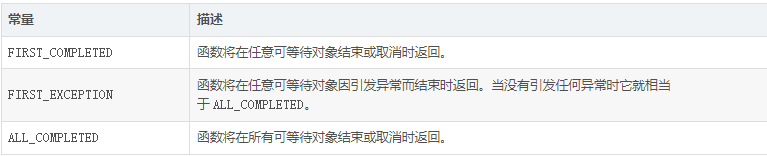
并发地运行多个可等待对象并在指定条件满足时返回:(done, pending)。不会因超时而抛出异常;若设定了 timeout,超时后未完成的任务会作为 pending 返回,不会被自动取消。
- 典型用法:
- return_when=asyncio.ALL_COMPLETED:全部完成再返回
- return_when=asyncio.FIRST_COMPLETED:任一完成即返回
- return_when=asyncio.FIRST_EXCEPTION:出现第一个异常即返回
return_when 常量示意:
示例:任一完成即返回
# 等待条件示例
import asyncio
import time

async def say_after(delay: float, what: str):
    print(f"Begin {what}, at {time.strftime('%X')}")
    await asyncio.sleep(delay)
    print(f"End {what}, at {time.strftime('%X')}")
    return what

async def main():
    aws = [
        asyncio.create_task(say_after(3, 'First')),
        asyncio.create_task(say_after(2, 'Second')),
        asyncio.create_task(say_after(1, 'Third')),
    ]
    done, pending = await asyncio.wait(aws, return_when=asyncio.FIRST_COMPLETED)

    # 输出最先完成的结果
    for t in done:
        print('first done:', t.result())

    # 记得后续处理未完成的 pending(比如取消或继续等待)
    for t in pending:
        t.cancel()

asyncio.run(main())
按完成顺序处理:asyncio.as_completed()
按“谁先完成谁先产出”的顺序获取结果,便于流水线式处理。与 wait() 不同的是,as_completed 返回一个可迭代的协程序列,你可以逐个 await 得到已完成任务的结果。
# 按完成顺序处理的示例
import asyncio
import time

async def say_after(delay: float, what: str):
    print(f"Begin {what}, at {time.strftime('%X')}")
    await asyncio.sleep(delay)
    print(f"End {what}, at {time.strftime('%X')}")
    return what

async def main():
    aws = [
        asyncio.create_task(say_after(3, 'First')),
        asyncio.create_task(say_after(2, 'Second')),
        asyncio.create_task(say_after(1, 'Third')),
    ]
    # 谁先完成就先返回对应的“可等待对象”
    for coro in asyncio.as_completed(aws):
        earliest = await coro
        print('as_completed:', earliest)

asyncio.run(main())
小结:
- wait_for 用于给单个 awaitable 加超时;超时会抛 TimeoutError,并尝试取消内部任务
- wait 用于成组等待并返回 (done, pending);超时不抛错,不会自动取消 pending
- as_completed 按完成顺序获取结果,适合流式消费多个任务的产出
运行协程的几种方式
- 使用 create_task 当你希望“安排并发执行”,当前协程可以继续做别的事,稍后再通过 await task/gather 收集结果。
- 使用 await 当你需要“立即等待结果”,后续代码依赖该结果再继续。
- 需要在后台长期运行的观察/监控型协程(例如心跳、指标上报),应使用 create_task 启动为后台任务,并在合适的时机 await 或取消。
- 如果只是顺序调用下一步,直接 await 即可;不需要 create_task 再立即 await。
代码示例:并发执行 vs 顺序等待
# 并发执行多个子任务,主协程可继续执行其他逻辑
async def main():
    # 创建任务后立即调度执行
    t1 = asyncio.create_task(worker(1))
    t2 = asyncio.create_task(worker(2))
    # 这里可以做其他事...
    # 最后统一等待
    await asyncio.gather(t1, t2)
# 顺序等待,后续逻辑依赖结果
async def main():
    result = await compute()
    print(result)
常见陷阱:await 无限循环导致后续代码“永远不执行”
# 错误示例:monitor 一直运行,导致下面的 await text() 永远到不了
async def monitor():
    while True:  # 无限循环
        await asyncio.sleep(1)  # 可取消点

async def text():
    print("执行一次文本任务")

async def main():
    await monitor()  # 一直不返回
    await text()     # 永远执行不到
解决方式 1:并发运行,把不会返回的任务放到后台。
async def main():
    mon_task = asyncio.create_task(monitor())  # 后台运行
    await text()  # 正常执行
    # ...一段时间后需要退出
    mon_task.cancel()  # 或配合事件优雅停止
    try:
        await mon_task
    except asyncio.CancelledError:
        pass
解决方式 2:使用 Event 作为“停止信号”,在需要时优雅退出循环(见并发原语-Event)。
stop_evt = asyncio.Event()

async def monitor():
    while not stop_evt.is_set():
        # 执行监控逻辑
        await asyncio.sleep(1)

async def main():
    t = asyncio.create_task(monitor())
    await asyncio.sleep(5)  # 运行一段时间
    stop_evt.set()          # 触发停止
    await t                 # 等待清理完成
常见问题与提示
- 避免把“永不返回”的协程直接放在 await 后面,否则会阻塞后续逻辑;改用 create_task 启动后台任务,或引入停止信号配合退出。
- create_task 只是“安排执行”,并不会阻塞当前协程
- 调试异步代码可打开事件循环的 debug 模式或使用 tracemalloc 定位泄漏
- CPU 密集型任务不适合在事件循环中执行,考虑多进程/线程池配合 run_in_executor
相关内容
扩展阅读
- asyncio 官方文档:协程、任务与 Future
- PEP 492: Coroutines with async and await syntax
| 最后更新: 2024-01-15 | 作者: Python 编程指南 | 版本: 1.0 |
讨论与反馈
欢迎在下方留言讨论,分享你的学习心得或提出问题。评论基于GitHub Issues,需要GitHub账号。